Creating a Pinterest pin is easy.
Creating a Pinterest pin that actually gets clicked?
That’s a little different.
One of the biggest mistakes new bloggers make is focusing only on how a pin looks.
They spend hours choosing colors, fonts, and graphics.
Then the pin gets no clicks.
The truth is that beautiful pins don’t automatically drive traffic.
Pinterest users aren’t clicking because a pin is pretty.
They’re clicking because a pin promises something they want.
In this guide, I’ll show you what makes a Pinterest pin clickable, the elements every pin should include, and the common mistakes that stop people from clicking.
Short on Time?
Here’s what makes a good Pinterest pin:
✔ Clear text
✔ Specific promise
✔ Easy-to-read design
✔ Strong keyword usage
✔ Curiosity
✔ Helpful content behind the click
Everything else is secondary.
Remember What Pinterest Users Are Doing
Before creating a pin, it’s important to understand the mindset of the person scrolling.
People open Pinterest because they’re looking for something.
Maybe it’s:
- A solution
- An idea
- Inspiration
- Instructions
- A shortcut
They’re not scrolling to admire graphic design.
They’re scrolling to find answers.
The best pins make it immediately obvious:
“This will help you.”
The Most Important Part of Your Pin
Many bloggers think it’s the image.
It’s not.
It’s the headline.
Your headline is what gets the click.
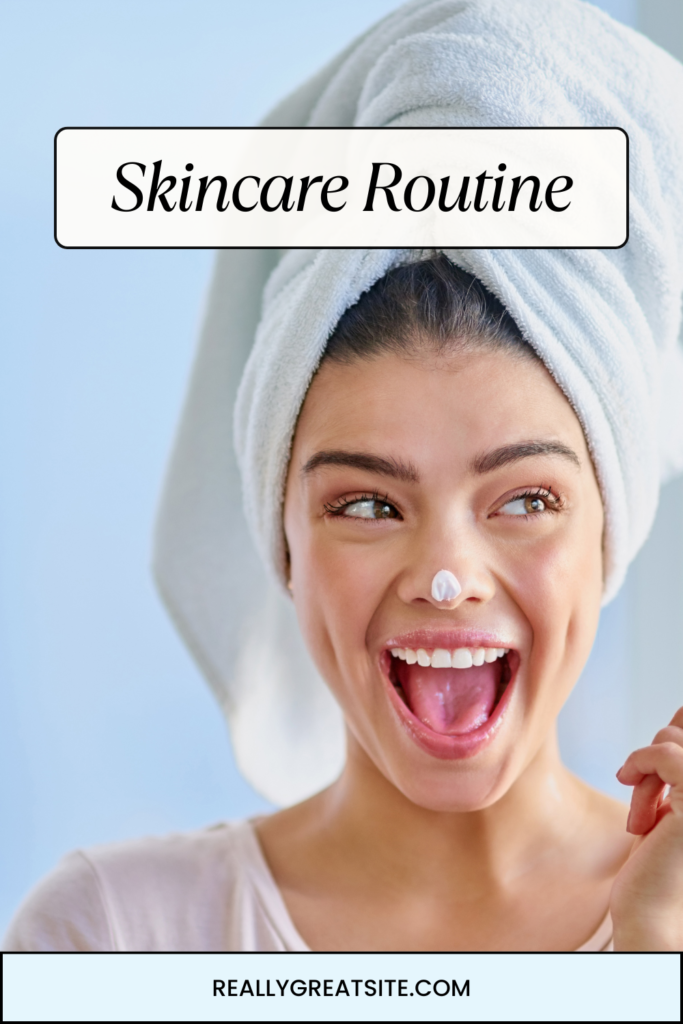
Imagine these two pins:
Pin #1
Pin #2
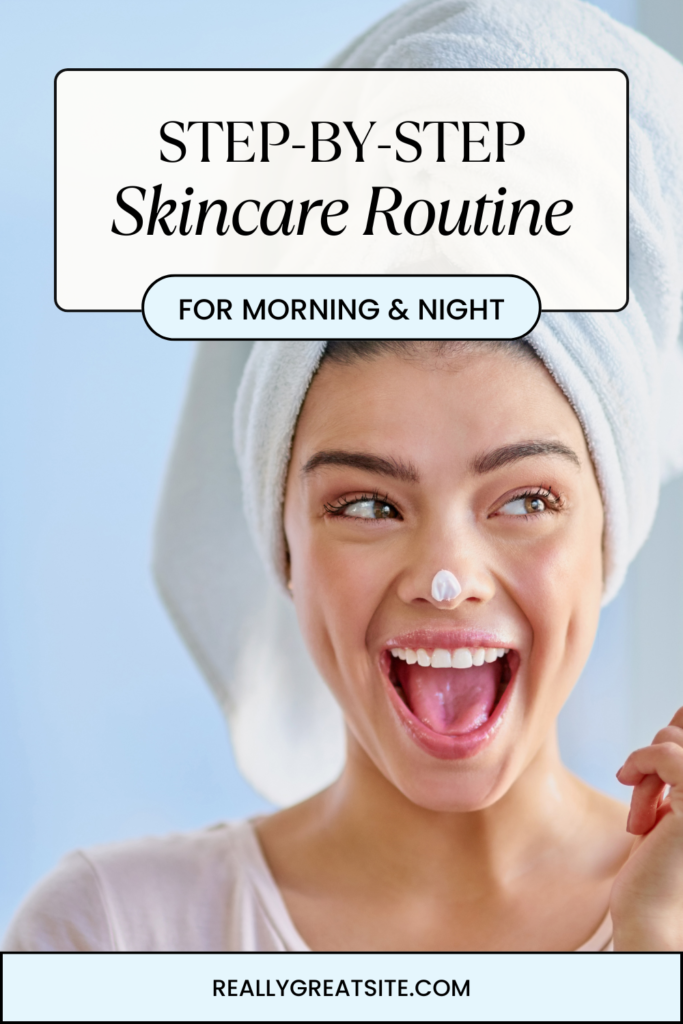
Which one would you click?
Probably the second.
Because it’s specific.
Specificity wins.
Write Headlines That Promise a Result
People don’t click on content because of the topic.
They click because of the outcome.
They want to know:
“How will this help me?”
For example, imagine someone is looking for skincare advice.
Instead of:
Skincare Routine
Try:
A Simple Skincare Routine for Beginners
Instead of:
Acne Tips
Try:
7 Acne-Fighting Skincare Tips That Actually Work
Instead of:
Vitamin C Serum
Try:
How to Use Vitamin C Serum for Brighter Skin
Notice the difference?
The first titles tell readers what the topic is.
The second titles tell readers what they’ll learn or achieve.
Pinterest users are often looking for solutions, ideas, or answers.
The clearer the benefit, the stronger the click.
When creating pin titles, ask yourself:
“Does this tell readers what they’ll get?”
If the answer is yes, you’re on the right track.
Make Your Text Easy to Read
This sounds obvious.
But it’s one of the most common mistakes.
Pinterest users are scrolling quickly.
If they have to work to read your text, they’ll keep scrolling.
Use:
- Large fonts
- Clear fonts
- High contrast
- Minimal clutter
A simple pin that is easy to read will usually outperform an elaborate pin that’s difficult to understand.
Don’t Try to Say Everything
Another common mistake?
Trying to fit too much information into one title.
A Pinterest pin isn’t the full article.
It’s an invitation to read the article.
Your goal is to spark interest—not explain everything.
For example, imagine you’re creating a pin about skincare.
Good:
A Simple Skincare Routine for Beginners
Less Effective:
A Complete Skincare Routine for Beginners Including Cleansing, Exfoliating, Moisturizing, Sunscreen, Anti-Aging Products, Acne Treatment, and Product Recommendations
Which one is easier to understand at a glance?
The first one.
The second title may contain more information, but it feels overwhelming.
Pinterest users scroll quickly.
They don’t stop to read a paragraph.
They scan for something that solves a problem.
The more complicated your title becomes, the harder it is for people to immediately understand what you’re offering.
Keep your message focused.
Keep your promise clear.
Remember:
A confused reader rarely clicks.
A clear reader often does.
Use Images That Support the Topic
Your image should reinforce your message.
When someone sees your pin, they should immediately understand what it’s about.
For example, imagine you’re creating a pin about skincare.
You might use:
- Skincare products
- A bathroom vanity
- A serum bottle
- A person applying moisturizer
- A clean, organized skincare setup
The image instantly tells the viewer:
“This pin is about skincare.”
Now imagine the same skincare article uses a random photo of a beach.
Would it still work?
Maybe.
But it creates confusion because the image doesn’t support the topic.
The goal isn’t to create the most beautiful image.
The goal is to create an image that makes sense.
When the image and title work together, readers can quickly understand what they’re clicking on.
And that’s exactly what you want on Pinterest.
Keep it simple.
If the pin is about skincare, show skincare.
If the pin is about home decor, show a room.
If the pin is about recipes, show food.
The image doesn’t need to be complicated.
It just needs to support the message.
Create Multiple Pins for Every Blog Post
One of the easiest ways to increase Pinterest traffic is to create more than one pin.
Different people respond to different designs.
For a single article, try:
- A bold text design
- A minimalist design
- A list-style design
- A photo-focused design
More pins mean more opportunities for discovery.
Use Pinterest Keywords
Pinterest needs to understand your content.
Keywords help make that happen.
Include keywords in:
- Pin title
- Pin description
- Board name
The goal is to help Pinterest connect your pin with the people searching for it.
The Click Test
Before publishing a pin, ask yourself:
If I knew nothing about this topic, would I click this?
If the answer is no, revisit:
- The headline
- The design
- The promise
Often small changes make a big difference.
Common Pinterest Pin Mistakes
Tiny Text
If people can’t read it on mobile, it won’t perform well.
Generic Headlines
“Skin Care”
isn’t nearly as compelling as
“10 Skin Care Tips I Wish I Knew Sooner.”
Too Much Design
Pinterest is not a graphic design competition.
Clarity beats creativity.
Misleading Clickbait
If the pin promises one thing and the article delivers something else, readers lose trust.
Always deliver what you promise.
Only Creating One Pin
Every blog post deserves multiple opportunities to be discovered.
Your Pinterest Pin Checklist
Before publishing a pin:
☐ Clear headline
☐ Easy-to-read text
☐ Specific promise
☐ Relevant image
☐ Pinterest keyword included
☐ Mobile-friendly design
☐ Links to helpful content
☐ At least 2–3 additional pin designs planned
Your Next Step
Creating Pinterest pins doesn’t require fancy design skills.
It requires clarity.
The best Pinterest pins tell people exactly what they’ll get if they click.
Focus on helping.
Focus on being specific.
Focus on making your content easy to understand.
Do that consistently, and you’ll already be ahead of many new Pinterest creators.
Read Next
👉 How to Create Pinterest Pins in Canva (Step-by-Step)
👉 Pinterest Keyword Research for Beginners
👉 Pinterest for Bloggers: A Beginner’s Guide to Getting Traffic